Salesforce MCP in 2026: What Replaces the DX MCP Server
Salesforce's DX MCP server reached end of life on November 2, 2026. What still works, what Salesforce recommends instead, including Metadata Grounding, and where Avonni fits.
Last checked against Salesforce's documentation on November 10, 2026.
TL;DR
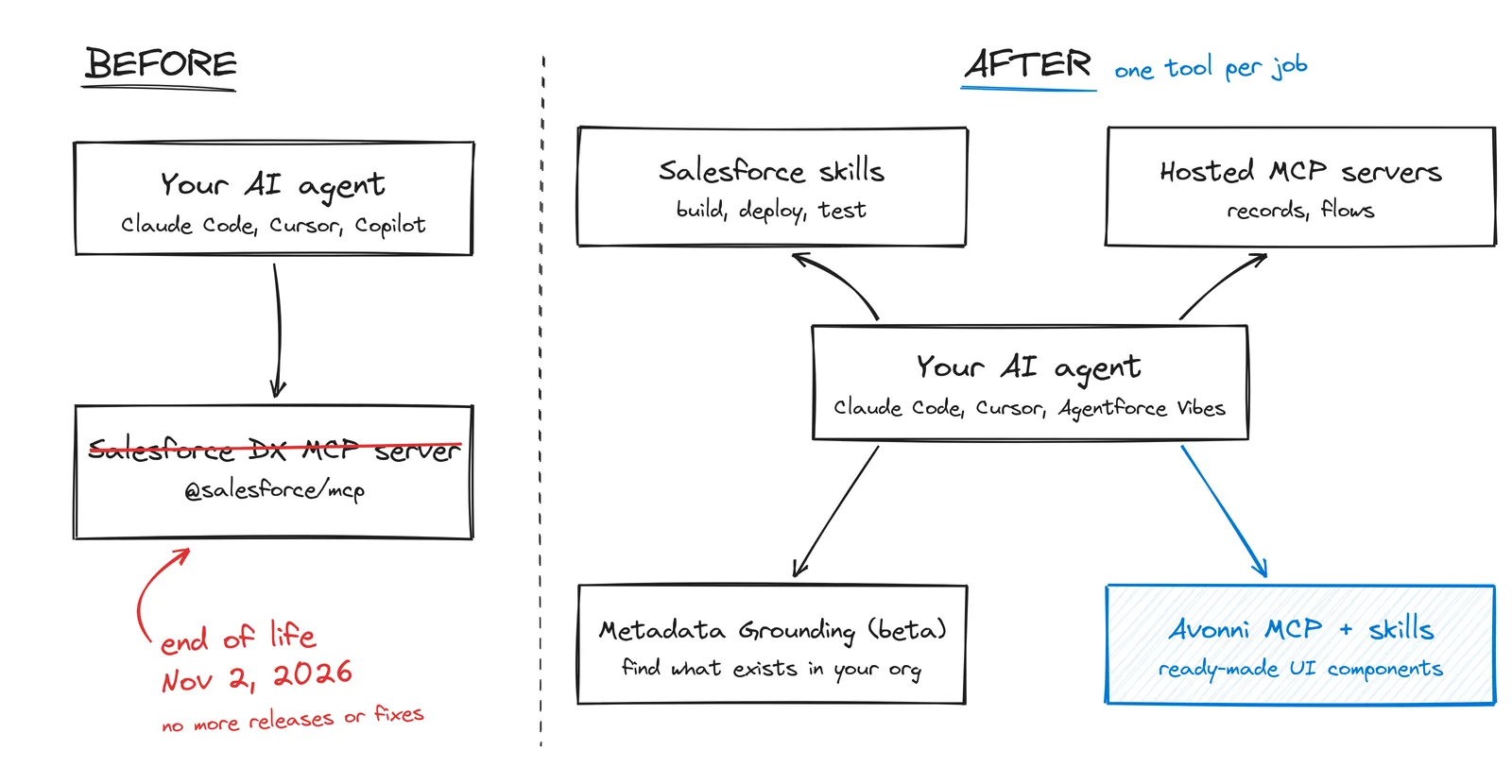
The Salesforce DX MCP server (@salesforce/mcp) reached end of life on November 2, 2026. Existing installs still run, but nothing gets fixed.
Salesforce now splits the job: skills for development, Hosted MCP Servers for org data, and Metadata Grounding (beta) so the agent sees what your org already has.
None of them gives your agent ready-made UI. The Avonni MCP server and skills let it configure packaged components instead of rebuilding every screen.
Give your AI agent ready-made components
Install Avonni LWC Components, then connect the free Avonni MCP server so your agent configures components instead of rebuilding them. Start free with 10 production licenses.
MCP (Model Context Protocol) is the open standard that lets an AI assistant call tools in another system. "Salesforce MCP" usually means one of these:
DX MCP server
Hosted MCP Servers
Metadata Grounding
What it is
Local server for developers (@salesforce/mcp)
MCP endpoints Salesforce runs for your org
Read-only search of your org's metadata
Built for
Deploy, retrieve, tests
Records, flows, Apex actions
Finding what already exists
Status
End of life, November 2, 2026
Generally available since April 2026
Beta since November 5, 2026
A fourth meaning is Agentforce itself: agents can call external MCP tools, and external clients can call your agents. That side expanded in Winter '27 and isn't covered here.
Naming detail: Salesforce says its Headless 360 MCP Server (beta) "will be renamed to the Salesforce MCP Server when it reaches general availability" (Salesforce Developers Blog). So the name is about to belong to a new product, not the DX server.
What happened to the DX MCP server
Salesforce announced the end of life in a pinned GitHub issue, forcedotcom/mcp #46: after November 2, 2026 the server "is no longer maintained or supported, and no further releases will be shipped."
As of November 10:
The forcedotcom/mcp and salesforcecli/mcp repositories are archived.
The npm package is marked deprecated but still installs. The last version is 0.30.15.
Your existing MCP configs keep running. They just won't get fixes when a Salesforce release or a client update breaks something. If your config says @salesforce/mcp@latest, "latest" will never change again.
The LWC and Code Analyzer toolsets had already moved to skills earlier in 2026 (LWC Developer Guide).
What replaces it
Salesforce skills
A skill is a folder with a SKILL.md file that teaches an agent one task. The agent loads it only when needed, so skills cost far less context than dozens of always-on MCP tools.
Salesforce's library, forcedotcom/sf-skills, covers Apex, objects and fields, Flows, LWC, permission sets, Data 360 and more. It comes preinstalled and auto-updated in Agentforce Vibes. The README warns that skills "may be renamed, restructured, or removed between releases", so re-check after updates. In Claude Code, Cursor or Codex:
npx skills add forcedotcom/sf-skills
Claude Code users can also install Salesforce's official plugin, which bundles core skills and MCP servers (Winter '27 developer guide):
MCP endpoints that Salesforce runs for your org. Every call runs as the signed-in user, so permissions and sharing apply. They are generally available for Enterprise Edition and above, and you can try them free in a Developer Edition org. Standard servers cover record reads and updates, Data 360 and more, and you can build custom servers that expose your flows, invocable Apex and named queries (servers reference).
They are not a drop-in replacement for the DX server. Salesforce describes them as "data and logic access for external AI tools", not development and deployment (Developer Edition announcement).
Connect one to Claude in four steps (from Salesforce's setup guide; try a sandbox first):
In Setup, open API Catalog > MCP Servers and enable platform/sobject-reads, which is read-only.
Create an External Client App with the mcp_api and refresh_token scopes and Claude's callback URL. Connected Apps aren't supported.
In Claude, add a custom connector with https://api.salesforce.com/platform/mcp/v1/platform/sobject-reads (add /sandbox after v1 for a sandbox).
Paste the app's consumer key as the OAuth client ID and sign in. Claude Code picks up the same connector.
In Agentforce Vibes, Salesforce's MCP servers show up in the Toolkit tab once your admin enables them, with no External Client App needed. Keep an eye on the tool count: Salesforce suggests about 20 active tools at most (Vibes MCP docs).
Metadata Grounding (beta, November 5)
Coding agents often rebuild what your org already has, because they can't see it. Metadata Grounding is a read-only MCP server that lets the agent search your org's metadata in plain English before it writes code.
Three tools: describe_metadata, search_metadata, query_metadata.
70+ metadata types, including objects, fields, LWC, Apex and flows.
Works with any MCP client, such as Claude Code, Cursor or ChatGPT. It returns metadata, not source code.
Needs Data 360 and Salesforce Catalog, plus admin activation. Not available in scratch orgs.
It is also reachable through the Headless 360 MCP Server (beta), with different tool names (Discover, Describe, Dispatch), so prompts built on the three names above won't carry over unchanged.
Salesforce says it will also ship in Agentforce Vibes and the Claude Code plugin. Treat that as announced until it shows up in your tools. Salesforce recommends a simple pattern: describe, then search, then query the record before writing code. You can make it the default with a project rule such as "search my org with Metadata Grounding before you create an object, field, component or class", or install the platform-metadata-grounding-get skill. The idea, in Salesforce's words: agents "extend what you have rather than rebuild it."
Migration checklist
Our reading of Salesforce's docs. There is no official one-to-one mapping.
If you used the DX MCP server to…
Move to
Deploy, retrieve, manage orgs
Salesforce skills + the Salesforce CLI, or the Claude Code plugin
Run Apex tests
Salesforce skills, or sf apex run test
Generate or review LWC
LWC skills
Run Code Analyzer
Code Analyzer skills or CLI
Find what exists in your org
Metadata Grounding (beta)
Query or update records from chat
A Hosted MCP Server, starting with SObject Reads in a sandbox
Find every config that calls @salesforce/mcp (.mcp.json, .cursor/mcp.json, .vscode/mcp.json), including shared repos.
Pin 0.30.15 instead of @latest while you migrate.
Install the skills, then remove DX toolsets once each skill works for you.
Ask your admin to enable a Hosted MCP Server, and Metadata Grounding if you have Data 360.
Re-test your prompts: skills are invoked differently from MCP tools.
Build vs buy: the gap no Salesforce MCP server fills
Skills, hosted servers and Metadata Grounding make your agent better at Salesforce. But ask it for a screen, say a data table with inline editing or a Kanban, and it still writes the component from scratch.
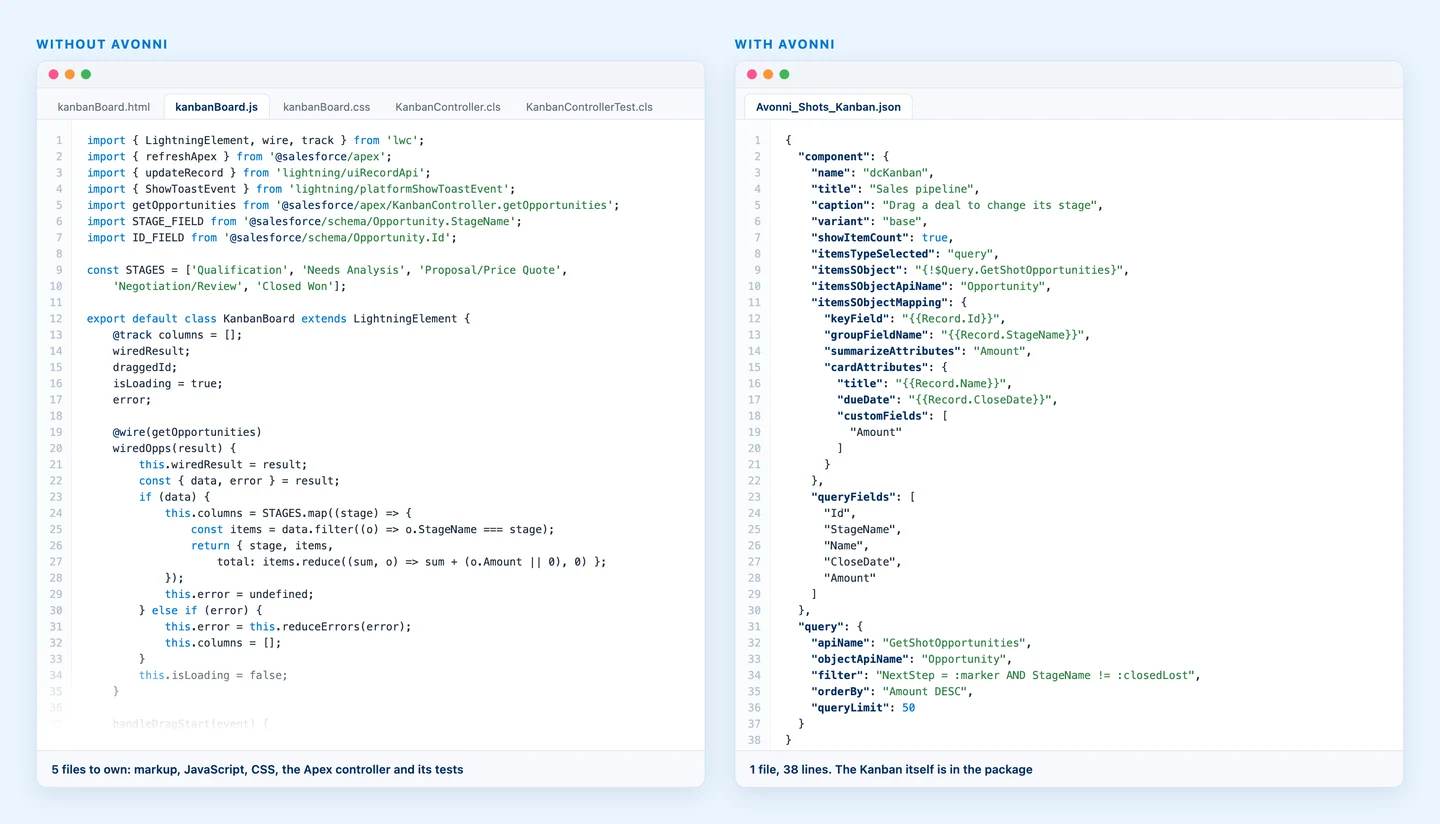
The first version is fast. Then every line is your team's to debug and re-test at each of Salesforce's three releases a year. AI made the first version nearly free. It didn't make maintenance free.
Without a component library, the agent writes and you own every file. With Avonni, it writes one configuration file.
That is what Avonni Agent Skills are for. Your agent calls ready-made components from the Avonni library, packaged, security reviewed and maintained by us, and writes only a thin layer of configuration. At Dreamforce 2026, the same prompt produced about six hundred lines without a library and fourteen lines with one (Dreamforce recap).
How Avonni plugs in
Avonni MCP server (https://mcp.avonnicomponents.com): a free, read-only documentation service with nine tools. It tells the agent which components exist and how each one is configured, so it stops guessing attributes.
Avonni Skills (avonni/skills): five skills for Lightning pages, screen flows, Experience Cloud sites and your own LWC code, plus an architect skill. In our docs' words: "the skills tell the assistant what to do; the MCP server tells it what's true."
Avonni MCP tool
What your agent gets
list_components
The components available for a surface: LWC code, Lightning pages, screen flows or Experience Cloud sites
get_component_docs
Properties, events and slots for one component
get_type
Exact types for complex attributes, such as data table columns
Styles, interactions, utils
Design tokens, actions like opening a flow or showing a toast, and LWC utility functions
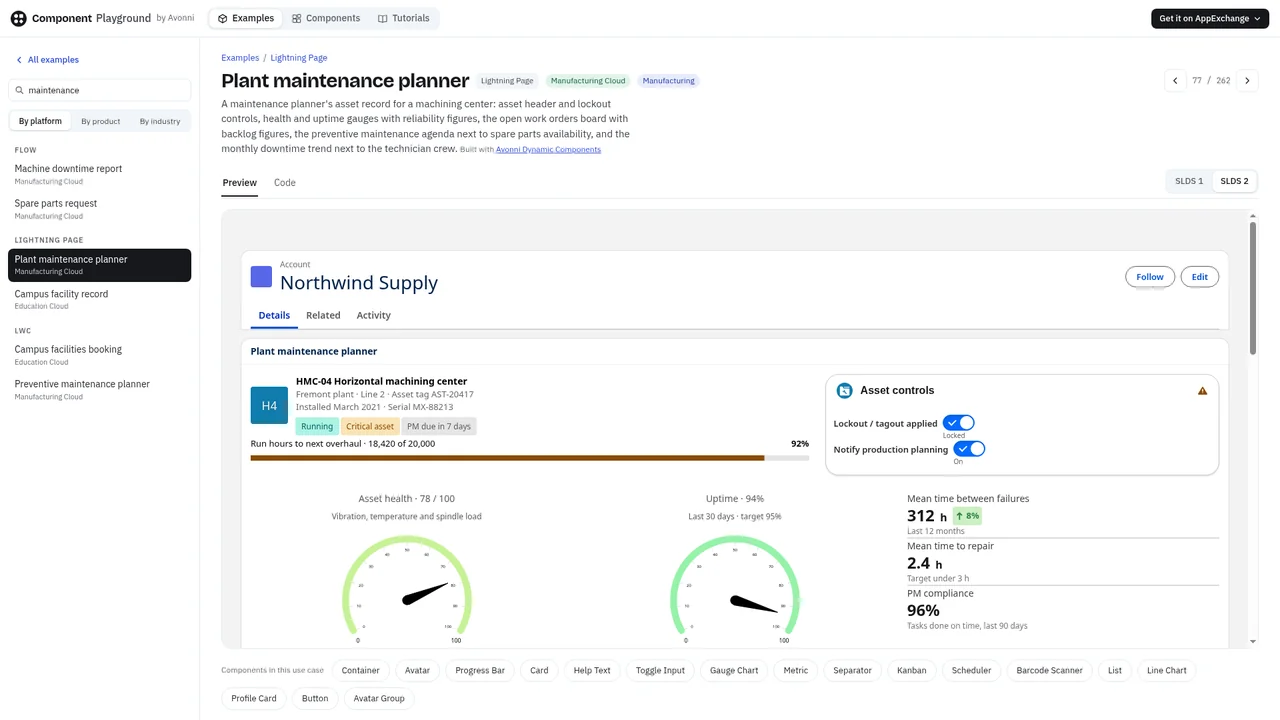
It runs alongside Salesforce's sf-skills, not on top of the DX server: theirs for Apex, metadata and deployment, ours for the UI. Developers use the 60+ Avonni LWC components as avonni-* tags; admins use the same library without code. You can try the components live in the Component Playground before installing anything.
You need Node.js 18+ and the Salesforce CLI logged in to your org. From your project folder:
In Cursor, VS Code or Agentforce Vibes, add the same URL as an MCP server. Then ask "List the available Avonni components." The 10-minute setup guide covers every assistant.
What it doesn't do: it doesn't deploy (you review and deploy the files), it doesn't read your records (pair it with a Hosted MCP Server for that), and it documents the latest Avonni release, so keep your packages up to date. When the agent needs something outside the library, you're back to custom code; see LWC components vs. building from scratch.
A real example: prompt to Lightning page
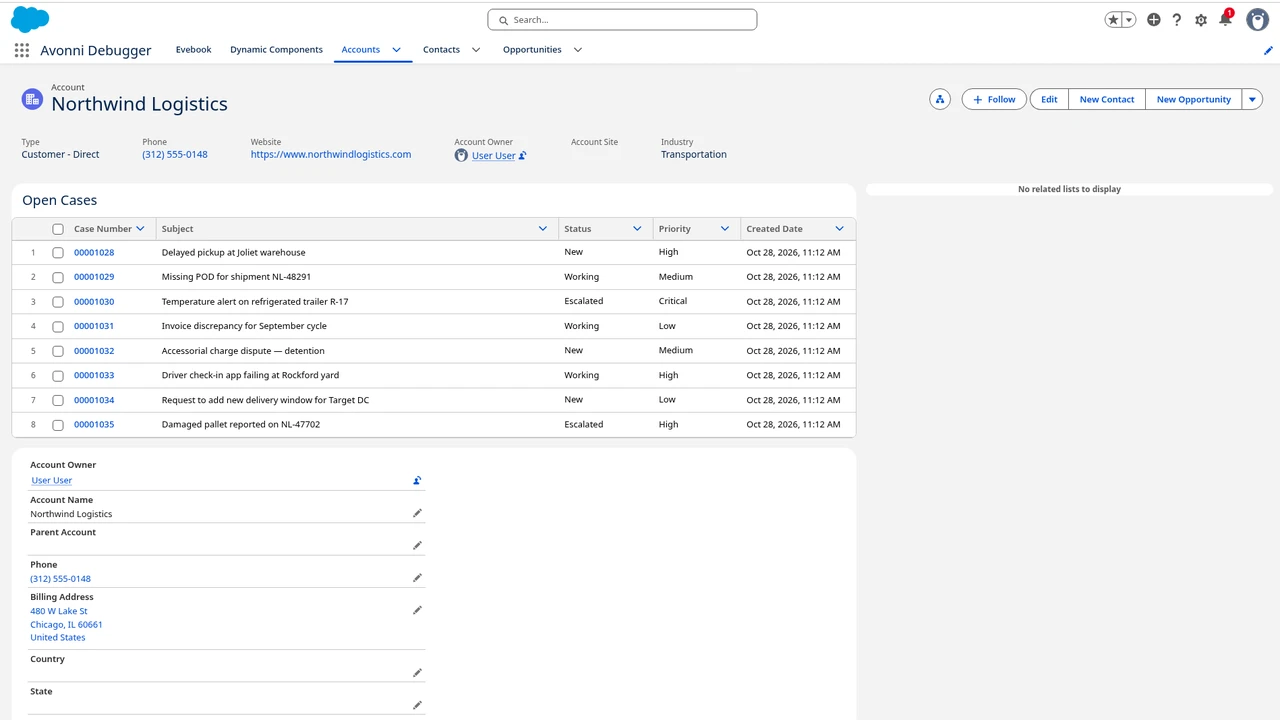
On October 28, 2026, in a scratch org with Avonni Dynamic Components and Claude Code connected to the Avonni MCP server, we asked:
Create an Avonni Dynamic Component for the Account record page: a Data Table of the account's open Cases with inline editing.
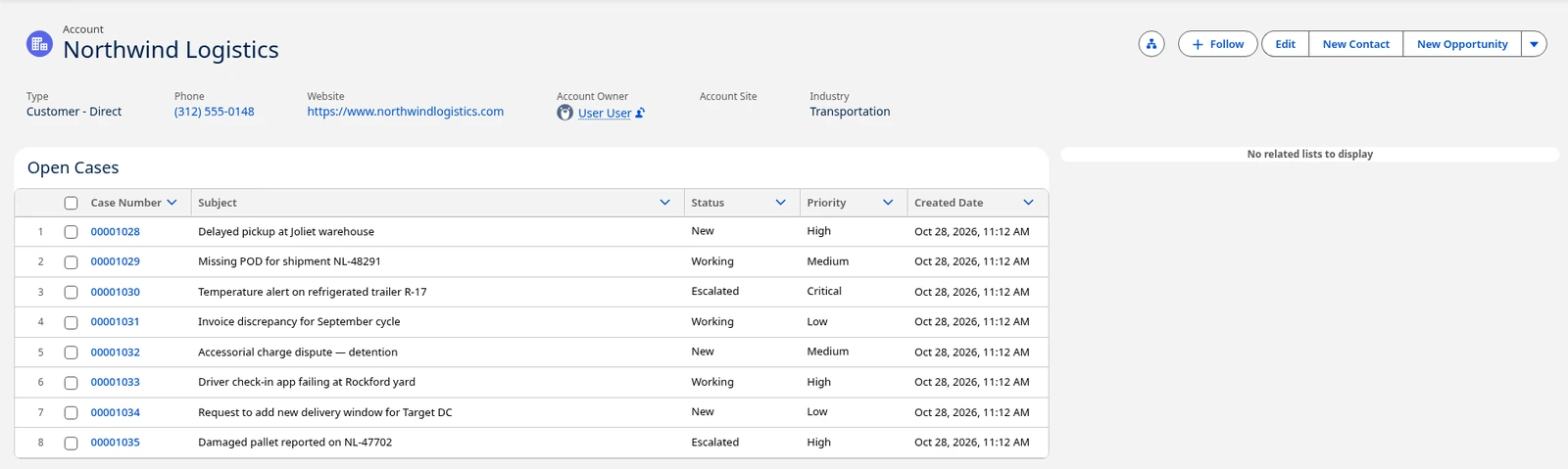
Claude Code called list_components and get_component_docs, then wrote one 57-line metadata file. After deploy:
The generated component on the Account record page: 8 open Cases, sortable columns, no custom LWC.
Show the generated 57-line file
<?xml version="1.0" encoding="UTF-8"?>
<CustomMetadata xmlns="http://soap.sforce.com/2006/04/metadata" xmlns:xsi="http://www.w3.org/2001/XMLSchema-instance" xmlns:xsd="http://www.w3.org/2001/XMLSchema">
<label>Account Open Cases</label>
<protected>false</protected>
<values>
<field>avxp__CreatedDateTime__c</field>
<value xsi:type="xsd:dateTime">2026-10-28T18:22:33.000Z</value>
</values>
<values>
<field>avxp__CreatedByName__c</field>
<value xsi:type="xsd:string">User User</value>
</values>
<values>
<field>avxp__Description__c</field>
<value xsi:type="xsd:string">Data table of the current Account's open Cases with inline editing, sorting and a link to each Case.</value>
</values>
<values>
<field>avxp__DynamicComponentName__c</field>
<value xsi:type="xsd:string">Account_Open_Cases</value>
</values>
<values>
<field>avxp__IsLastModified__c</field>
<value xsi:type="xsd:boolean">true</value>
</values>
<values>
<field>avxp__LastModifiedDateTime__c</field>
<value xsi:type="xsd:dateTime">2026-10-28T18:22:33.000Z</value>
</values>
<values>
<field>avxp__LastModifiedByName__c</field>
<value xsi:type="xsd:string">User User</value>
</values>
<values>
<field>avxp__ObjectApiName__c</field>
<value xsi:type="xsd:string">Account</value>
</values>
<values>
<field>avxp__Queries__c</field>
<value xsi:type="xsd:string">[{"apiName":"getOpenCases","objectApiName":"Case","filter":"AccountId = :recordId AND IsClosed = :isClosed","filterVariables":{"recordId":"{!$Component.RecordId}","isClosed":"{!$GlobalConstant.False}"},"filterVariablesTypes":{"recordId":"Id","isClosed":"Boolean"},"orderBy":"CreatedDate DESC","queryLimit":"200","id":"959b72cb-1d66-4fc0-b1b9-f52f57f9d724"}]</value>
</values>
<values>
<field>avxp__Resources__c</field>
<value xsi:type="xsd:string">[]</value>
</values>
<values>
<field>avxp__Status__c</field>
<value xsi:type="xsd:string">Inactive</value>
</values>
<values>
<field>avxp__Value__c</field>
<value xsi:type="xsd:string">[{"name":"dcDatatable","apiName":"Datatable1","value":{"title":"Open Cases","iconName":"standard:case","itemsTypeSelected":"query","itemsSObject":"{!$Query.getOpenCases}","itemsSObjectApiName":"Case","nbItems":"{!$Query.getOpenCases.nbItems}","keyField":"Id","showSortedByValue":true,"itemsSObjectMapping":[{"columnType":"objectField","fieldName":"CaseNumber","type":"text","sortable":true,"initialWidth":130,"typeAttributes":{"text.linkify":true}},{"columnType":"objectField","fieldName":"Subject","type":"text","sortable":true,"editable":true,"wrapText":true},{"columnType":"objectField","fieldName":"Status","type":"combobox","sortable":true,"editable":true,"initialWidth":140},{"columnType":"objectField","fieldName":"Priority","type":"combobox","sortable":true,"editable":true,"initialWidth":130},{"columnType":"objectField","fieldName":"CreatedDate","type":"date","sortable":true,"initialWidth":170,"typeAttributes":{"date.year":"numeric","date.month":"short","date.day":"2-digit","date.hour":"2-digit","date.minute":"2-digit"}}],"queryFields":["Id","CaseNumber","Subject","Status","Priority","CreatedDate"]},"id":"ab292a94-e2f4-4aa2-a2db-e0bd1638f9cd"}]</value>
</values>
<values>
<field>avxp__VersionNumber__c</field>
<value xsi:type="xsd:double">1</value>
</values>
</CustomMetadata>
Sorting and the live Case query worked. Inline editing showed the Save bar, but the change only persists once you add an update-record interaction, in Component Builder or with a follow-up prompt.
Which setup fits which team
Your team
Start with
Developers deploying and testing with AI
Salesforce skills or the Claude Code plugin, plus the CLI
It reached end of life on November 2, 2026: no support, no releases, archived repositories. Existing installs keep working, and the npm package still installs as deprecated.
What replaces the Salesforce DX MCP server?
Salesforce skills (forcedotcom/sf-skills) for development, the Claude Code plugin, and Hosted MCP Servers for data access.
Can I use Salesforce skills in Cursor or Claude Code?
Yes. Run npx skills add forcedotcom/sf-skills in your project. Any tool that supports the open Agent Skills format should work.
What is Salesforce Metadata Grounding?
A read-only MCP server, in beta since November 5, 2026, that lets a coding agent search your org's metadata before writing code. It needs Data 360 and Salesforce Catalog.
Does the Avonni MCP server need the DX MCP server?
No. It's a separate, free, read-only server hosted by Avonni. The Avonni Skills need Node.js, the Salesforce CLI and the Avonni MCP server.
Do I need a paid Avonni plan to use Avonni Agent Skills?
No. The Avonni MCP server and the Avonni Skills are free, including on the free plan.
Co-founder of Avonni and Head of Engineering, Jean-Baptiste has spent 8+ years building the next generation of low-code development tools for Salesforce. He leads the technical vision behind Avonni's interactive prototyping and component builder platform.