One component, everywhere you build

Every record has a story. Put it on a timeline.

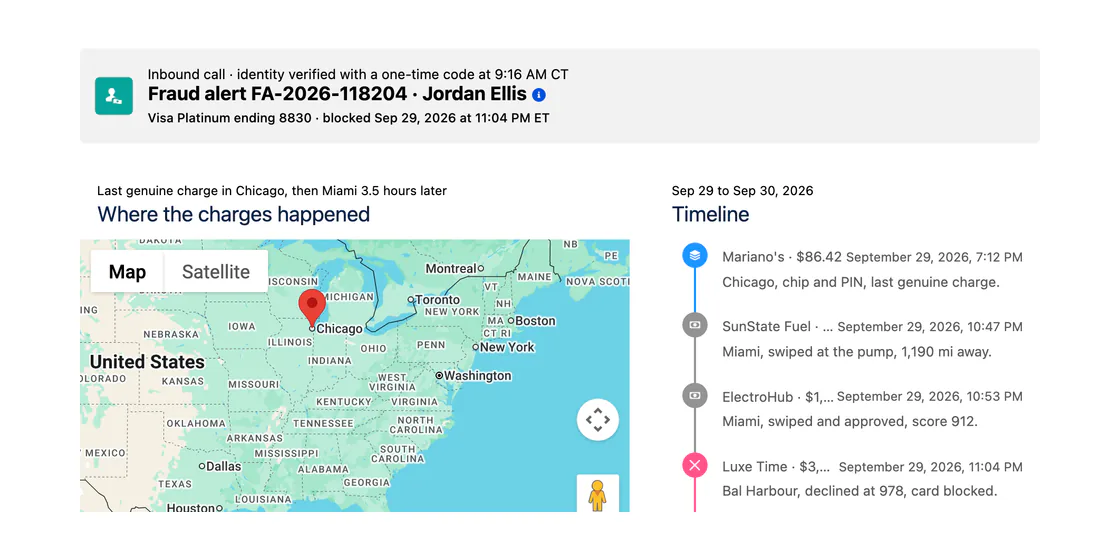
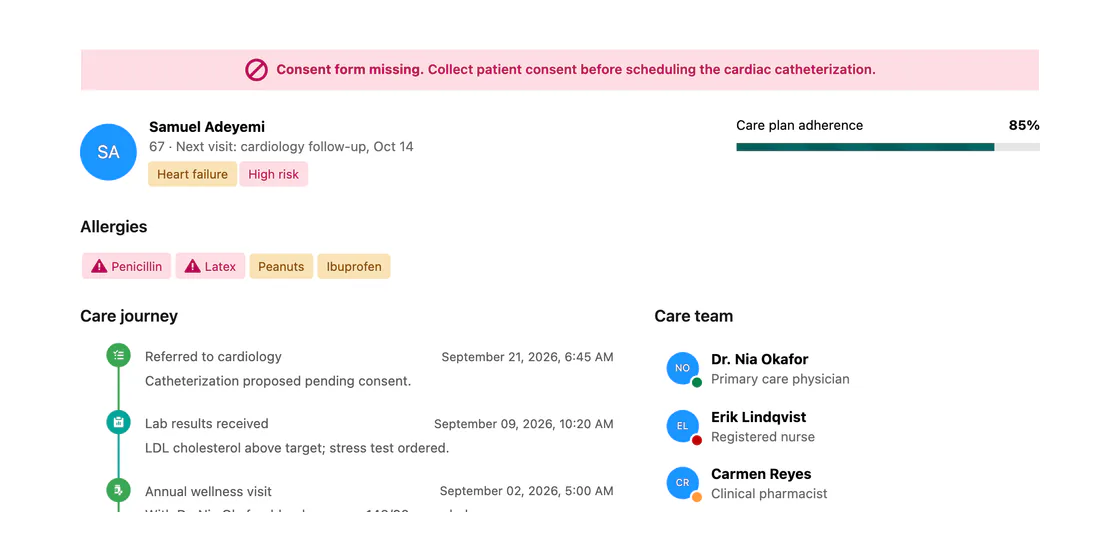
Show any object's history in order, grouped by day, week, month, or year, vertical or horizontal. The same timeline on Screen Flows, Lightning pages, and Experience Cloud, configured with clicks. No code.

4
grouping levels
2
orientations, vertical and horizontal
0
lines of Apex
Activity Timeline
MonthWeekDay
Call
Discovery with United Oil & GasAug 14
Logged by Sarah Chen · 32 min
Email
Proposal sent to procurementAug 9
Opened 3 times · 2 attachments
Event
Demo with the ops teamAug 5
4 attendees · 45 min
Task
Send pricing sheetAug 2
Completed · High priority
What it does

The history of a record, in order

Group activities by day, week, month, or year, search and filter them, and act on any one, without leaving the page.

Activity Timeline — Horizontal view
Showing 14/01 – 16/02 · 33 days · 12 items
Create follow-up task
Brunch meeting
Follow-up call
🎓Onboarding session
Meeting with Suzanne Smith
Brainstorming with Jasmine
Contract review
16/0123/0130/0106/0213/02
01/202107/202101/202207/202201/202307/202301/2024
And more, without code
v
Group by day, week, month, year
v
Vertical or horizontal
v
Search and filters
v
Per-item actions
v
Collapsible groups
v
Pagination
Same component, every surface

One timeline. Four places to put it.

The same timeline follows you across Salesforce. What changes is where it lives and how you add it, not what it can do.

Screen Flows

In a Flow screen

Drop the activityTimeline component onto any Flow screen and feed it a collection of records. Users see the sequence of events and move to the next step with the full picture.

Flow Screen Components
Lightning pages

On a record or app page

Build it visually with the dcActivityTimeline component in Dynamic Components, wire a query with no Apex, and drop it onto any Lightning page in App Builder.

Dynamic Components
Experience Cloud

On a portal or site

Add the AX-Timeline to any Experience Cloud page. It respects your sharing rules and guest access, so external users see only the history they should.

Experience Cloud Components
LWC / code

In your own component

Developers drop avonni-dd-timeline straight into an LWC template with documented attributes. Same timeline, in the markup you already own.

<avonni-dd-timeline
  title="Activity"
  query={activityQuery}
  group-by="month"
  orientation="vertical"
  searchable>
</avonni-dd-timeline>
LWC Components
Where teams use it

Built for the work people actually do

Account history at a glance

Show every call, email, and task on a record page in one timeline, grouped by month, so the whole story is in one place.

Context inside a Flow

Summarize what has already happened on a case or opportunity mid-Flow, so users decide the next step with the full picture.

Status history in a portal

Give external users a timeline of their own requests on an Experience Cloud site, so they can follow progress without asking.

The native timeline shows activities. Avonni shows any object's story.

Salesforce's activity timeline lives on record pages and covers tasks and events. Avonni times any object, groups it the way you want, and follows you onto Flows and portals too.

See it in Dynamic Components
4
grouping levels: day to year
4
places to build on, not just record pages
Any
object, not only tasks and events
Questions

Timeline, answered

Which package is the Timeline in?

It ships across the Avonni suite. The Flow version is in Flow Screen Components, the Lightning-page version in Dynamic Components, and the portal version in Experience Cloud Components. One subscription covers all three.

How can I group the items?

By day, week, month, or year. Groups can be collapsible, and future-dated items can roll into an upcoming section. You also choose the sort direction.

What records can it show?

Any standard or custom object with a date, not just tasks and events. Map each record to a title, date, description, avatar, and extra fields, then point the timeline at a collection or a no-code query.

Can it run horizontally?

Yes. Pick vertical or horizontal per timeline. Vertical adds per-item actions and grouping; horizontal spreads items across a range of days.

Do I need Apex or custom code?

No. Admins configure the Timeline entirely with clicks. Developers who prefer code can use the LWC version with documented attributes instead.

Put your records on a timeline

Install free from the AppExchange and add a timeline to your first Flow, page, or portal today. Talk to us when you are ready to scale.