LWC Component Library

The Salesforce LWC Component Library

55+ production-ready Lightning Web Components (data tables, schedulers, Kanban, maps) with a zero-Apex query engine. Drop in a tag, point it at an object, ship the feature.

55+
Components
0
Lines of Apex required
10
Free production licenses
THE WHOLE TEMPLATE
1<template>
2  <avonni-dd-scheduler
3    variant="timeline"
4    hidden-variants={hiddenVariants}
5    available-time-frames={workday}
6    query={workOrders}
7    mapping={mapping}
8    item-palette={palette}
9    item-actions={jobActions}
10    onitemactionclick={handleJob}>
11  </avonni-dd-scheduler>
12</template>
1 tag. Query, mapping and actions live in your JS.
Running in a Salesforce org
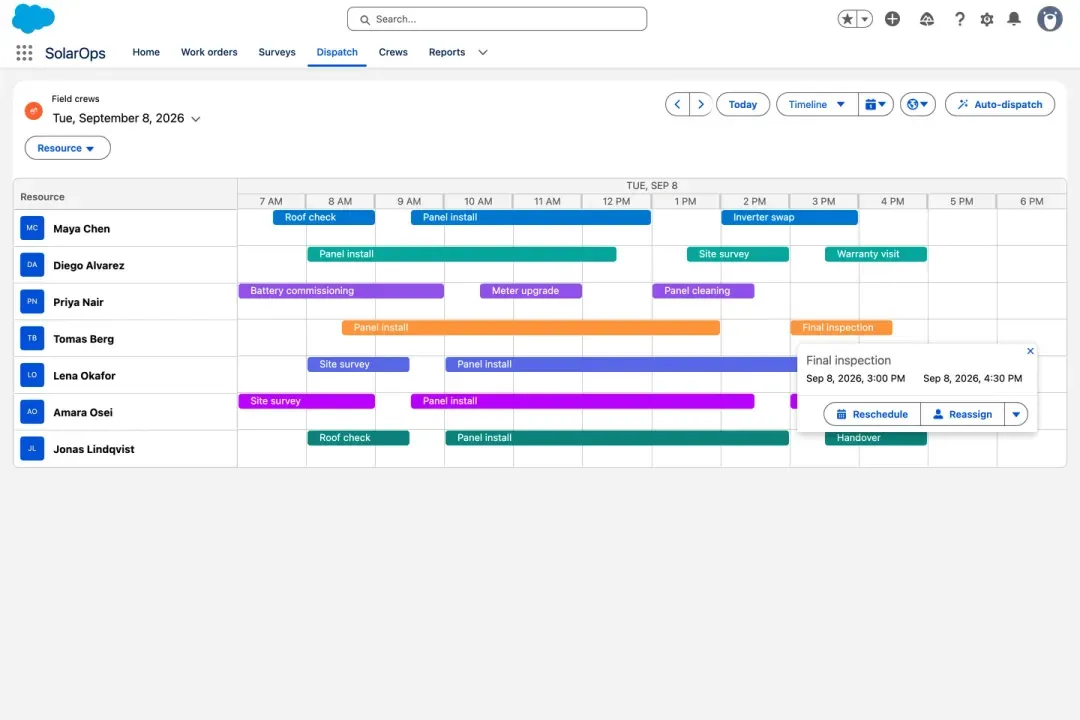
Avonni Scheduler in a Lightning Web Component: seven field technicians on a one day timeline with colored jobs and a popover offering Reschedule and Reassign
Live crew boardSeven technicians on one day, reschedule and reassign one click from any job. No scheduling code.
THE WHOLE TEMPLATE
1<template>
2  <avonni-dd-relationship-graph
3    label={accountName}
4    variant="horizontal"
5    query={accountTree}
6    mapping={mapping}
7    actions={rootActions}
8    group-actions={groupActions}
9    item-actions={itemActions}
10    onitemactionclick={handleOpen}>
11  </avonni-dd-relationship-graph>
12</template>
1 tag. Query, mapping and actions live in your JS.
Running in a Salesforce org
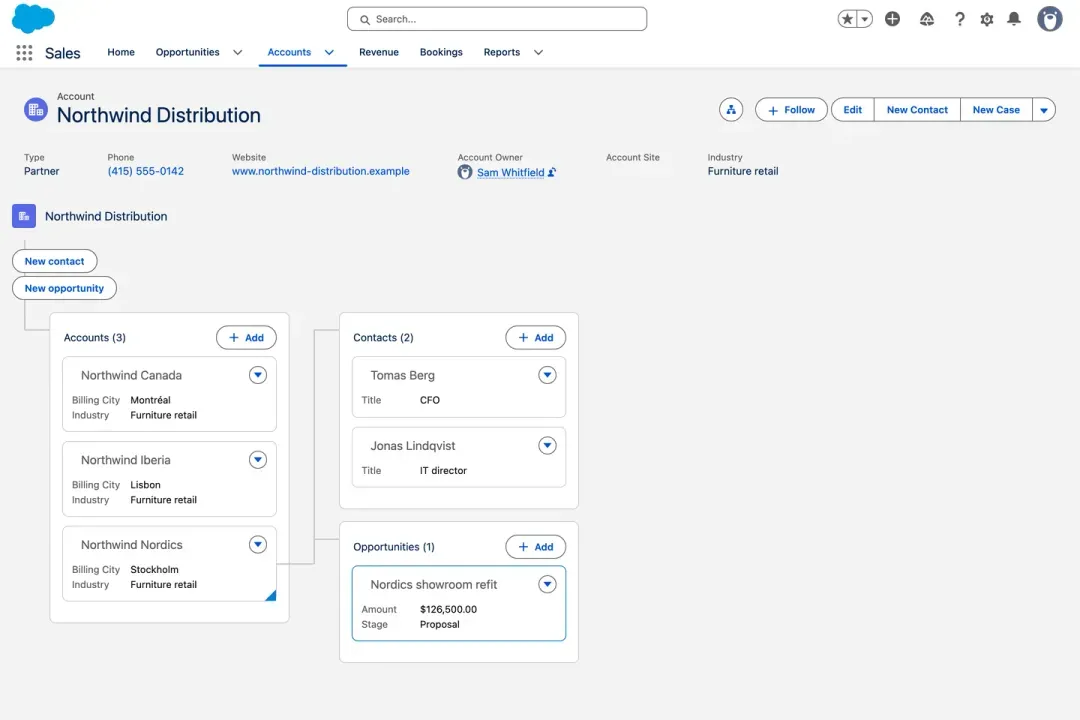
Avonni Relationship Graph in a Lightning Web Component on an Account record page: three subsidiaries, one selected, with its contacts and its open opportunity unfolding to the right
Account mapSubsidiaries, their contacts, their open deals, one click to drill. One nested query, no Apex.
THE WHOLE TEMPLATE
1<template>
2  <avonni-dd-datatable-group-by
3    header-title="Expense approvals"
4    query={expenses}
5    columns={columns}
6    group-by-attributes={groupBy}
7    filters={filters}
8    search-fields={searchFields}
9    header-actions={headerActions}
10    onheaderactionclick={handleApprove}>
11  </avonni-dd-datatable-group-by>
12</template>
1 tag. Query, mapping and actions live in your JS.
Running in a Salesforce org
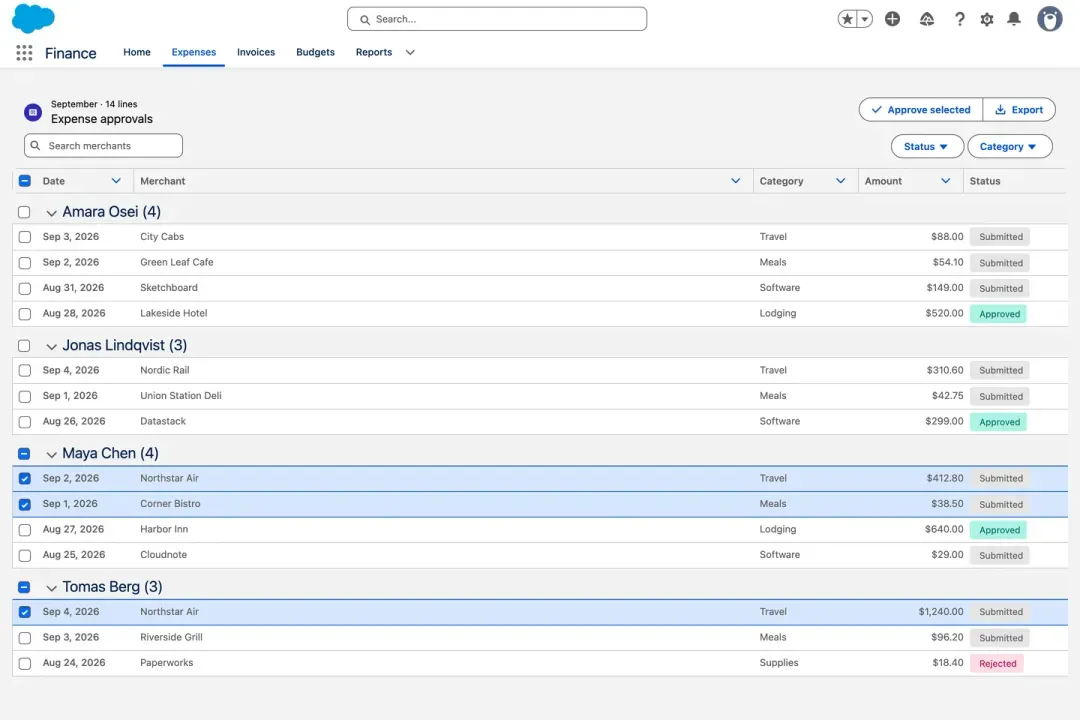
Avonni Data Table Group By in a Lightning Web Component: expense lines grouped by employee with counts, status badges, three checked rows and an Approve selected button
Expense approvalsFourteen lines grouped by employee, status badges, select then approve. A finance review in one tag.
The catalog

Two families. One managed package.

Data Driven
Full UIs in one tag.
15 record-driven components that run their own query. Point one at an object, skip the Apex.
Data Table
Data Table Group By
Kanban
Scheduler
Relationship Graph
Tree
TimelineList
Image List
Carousel
ChatMap
Leaflet Map
Metric
Pivot Table
55+
production LWC components
47 Core + 15 Data Driven, one managed package.
Core
Building blocks.
47 components that extend the base Lightning library, each documented.
Rating
*****
Progress Indicator
Avatar Group
AK
RL
MG
+2
The full library
Kanban
$1.2M
▲12.4%
Pipeline
Metric
Created
Qualified
Won
Timeline
★★★★★
Rating
Need the Q3 figures?
Sending them now
Chat
72%
Progress Circle
 Q1Total
West4288
East3167
Total73155
Pivot Table
Account type▼
Customer
Partner
Prospect
Combobox
▼Americas
▼Canada
▶Quebec
Tree
Color Picker
Scheduler
Barcode
Explore the full component library
→
Query mode

One tag. The whole data table.

A searchable, filterable, paginated Account table with inline editing. This is the entire markup.

accountTable.html
<template>
<avonni-dd-datatable
header-title="Key Accounts"
query={query}
columns={columns}
search-fields={searchFields}
filters={filters}
show-pagination>
</avonni-dd-datatable>
</template>

This tag replaces ~800 lines of hand-written LWC, Apex, and CSS.

✓
SOQL query, built in
✓
Search & user filters
✓
Pagination & caching
✓
Inline editing & saves
✓
Real-time refresh via platform events
✓
FLS & sharing rules respected
Kanban board in LWC without Apex tutorial
▶
Play here
5:12
Watch it built

A drag and drop Kanban in one LWC, without Apex

Cases by status on the Account page, saved with updateRecord. About 60 lines of code, and the full code is in the docs.

Agent Skills

Your AI assistant already speaks Avonni.

Claude Code, Cursor or Copilot reads the LWC catalog through the Avonni MCP server and writes the markup with documented attributes, not guesses. One tag where you would otherwise own a thousand generated lines.

Shown in Cursor

One prompt. One tag.

The avonni-lwc-components skill resolves every attribute and type from the Avonni MCP server before writing a line of markup. The heavy UI stays ours to maintain, your code stays yours.

Salesforce logo

Works with Claude, Cursor, Copilot, Gemini and Agentforce

accountCases.html — avonni-org — Cursor
EXPLORER
⌄ lwc
⌄ accountCases
accountCases.html
accountCases.js
accountCases.css
› accountHeader
› caseTimeline
accountCases.htmlaccountCases.js
1<template>
2 <avonni-dd-datatable
3 header-title="Open Cases"
4 query={query}
5 columns={columns}
6 show-pagination
7 onsave={handleSave}>
8 </avonni-dd-datatable>
9</template>
Agent ⌘I
Add a table of open Cases to
accountCases, editable inline.
I'll check the real Avonni LWC catalog before writing any markup.
MCP list_components✓
MCP get_component_docs✓
MCP get_type DdElementQuery✓
Skill avonni-lwc-components✓
Edited accountCases.html✓
Done. One tag, attributes from the docs. Nothing is deployed until you say so.
AcceptReject
Ask anything (⌘L)
Live in the Playground

60+ LWC screens you can open right now.

Real screens built with Avonni LWC Components inside a Lightning web component, one industry job each. Open one to see it run and copy its code.

Browse the 60+ LWC examples →
Pick the right tool

Where LWC Components fits in the Avonni lineup

The same components underneath. What changes is where you build, and who does the building.

Most teams run both: LWC Components where developers own the markup, Dynamic Components where admins configure the page.

Build vs buy
Do the math on building it yourself

AI writes the first version fast. Owning it across Salesforce releases is the real cost. Put in your own numbers and see the five-year picture.

Open the cost calculator
FAQ

Questions developers actually ask

How does licensing work?

LWC Components is a managed package installed from the AppExchange. You get 10 free production licenses, and sandbox use is unlimited, so your whole team can build and evaluate before adding seats.

Will it work with my existing custom LWCs?

Yes. Avonni components are standard Lightning Web Components. Compose them inside your own markup exactly like base lightning-* components, and wire them to your logic through documented events and methods.

Can my AI assistant write the markup for me?

Yes. Connect Claude Code, Cursor or Copilot to the Avonni MCP server and the avonni-lwc-components skill. Your assistant reads the real component docs before writing, so every attribute it uses exists.

What's the difference between query mode and static mode?

Query mode: pass a declarative query definition and the component fetches records, handles search, filters, pagination, and inline edits, with zero Apex. Static mode: pass your own items array and own the data layer when you need full control.

Does this affect my Apex test coverage?

No. The package is managed, so its code doesn't count toward your org's coverage requirement. Query mode also removes the need for Apex controllers on many features, so there's less of your Apex to write and less to test.

Where can I deploy these components?

Lightning App, Home, and Record pages, Experience Cloud sites, and inside your own custom LWC development. SLDS-compliant with styling hooks, so they blend into every surface.

Stop scaffolding. Start shipping.

Install the package, drop your first component on a page, and see how much of your backlog just became a configuration exercise.

Available on the AppExchange