Avonni installs from the AppExchange as a managed package and runs inside your Salesforce org. No Avonni server sits between your users and your records, and Salesforce reviews the package again every year.
Everything an Avonni component reads or writes stays inside your org. There is no Avonni backend to call.
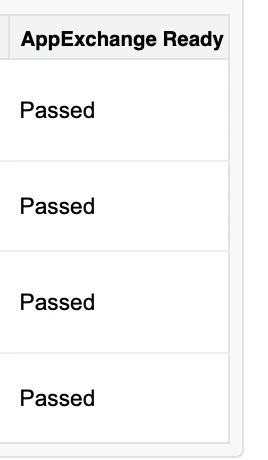
To stay listed on the AppExchange, a package has to pass Salesforce's security review, then pass it again every year and after any major change to its architecture. It is pass or fail.
Components read and write through Salesforce itself: Apex, Lightning Data Service and the User Interface API. There is no telemetry, no licensing check at runtime, and no Avonni database holding your records.
Data residency follows your Salesforce instance: an EU org keeps its data in the EU, a Hyperforce org stays in its region.
At rest and in transit, including Shield Platform Encryption when your org has it.
Every query runs as the viewing user, in USER_MODE. If a user can't see a record in a list view, they can't see it in an Avonni component either.
A field the user can't read never reaches the browser. Salesforce refuses the query rather than return it.
Create, read, edit and delete are checked per object, on every read and every write.
Org-wide defaults, role hierarchy, sharing rules, manual and team shares, Apex managed sharing. Avonni changes none of them.
In a screen flow, a query can switch to system mode for reads. It is off by default, and actions that write always run as the user.
Avonni has no credentials, no integration user and no standing access. Your users sign in to Salesforce, with your SSO, MFA, IP ranges and session rules.

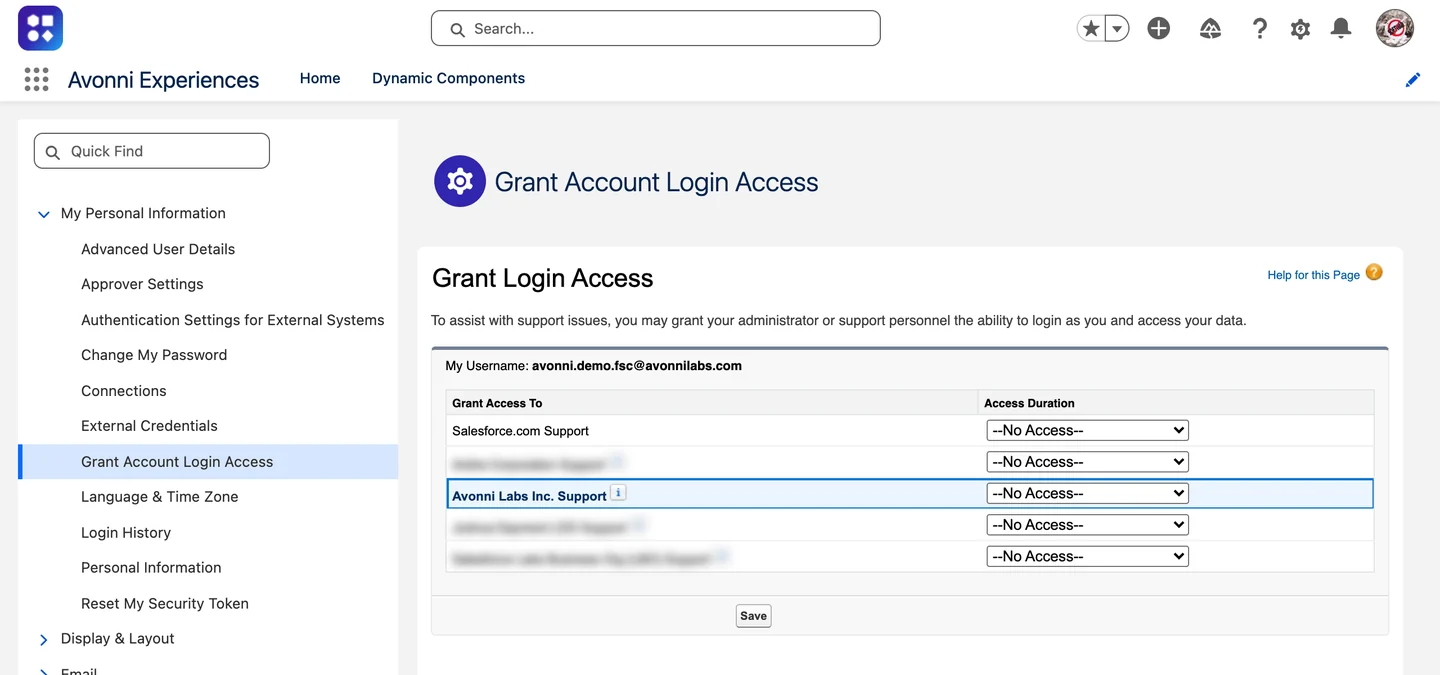
Grant Account Login Access, in a Salesforce org with Avonni installed. Support access exists only if you grant it.
You grant it, for the time you pick, and it ends on its own.
Every session shows in your Login History and Setup Audit Trail.
If your policy forbids it, we work from screen shares and exported configuration.
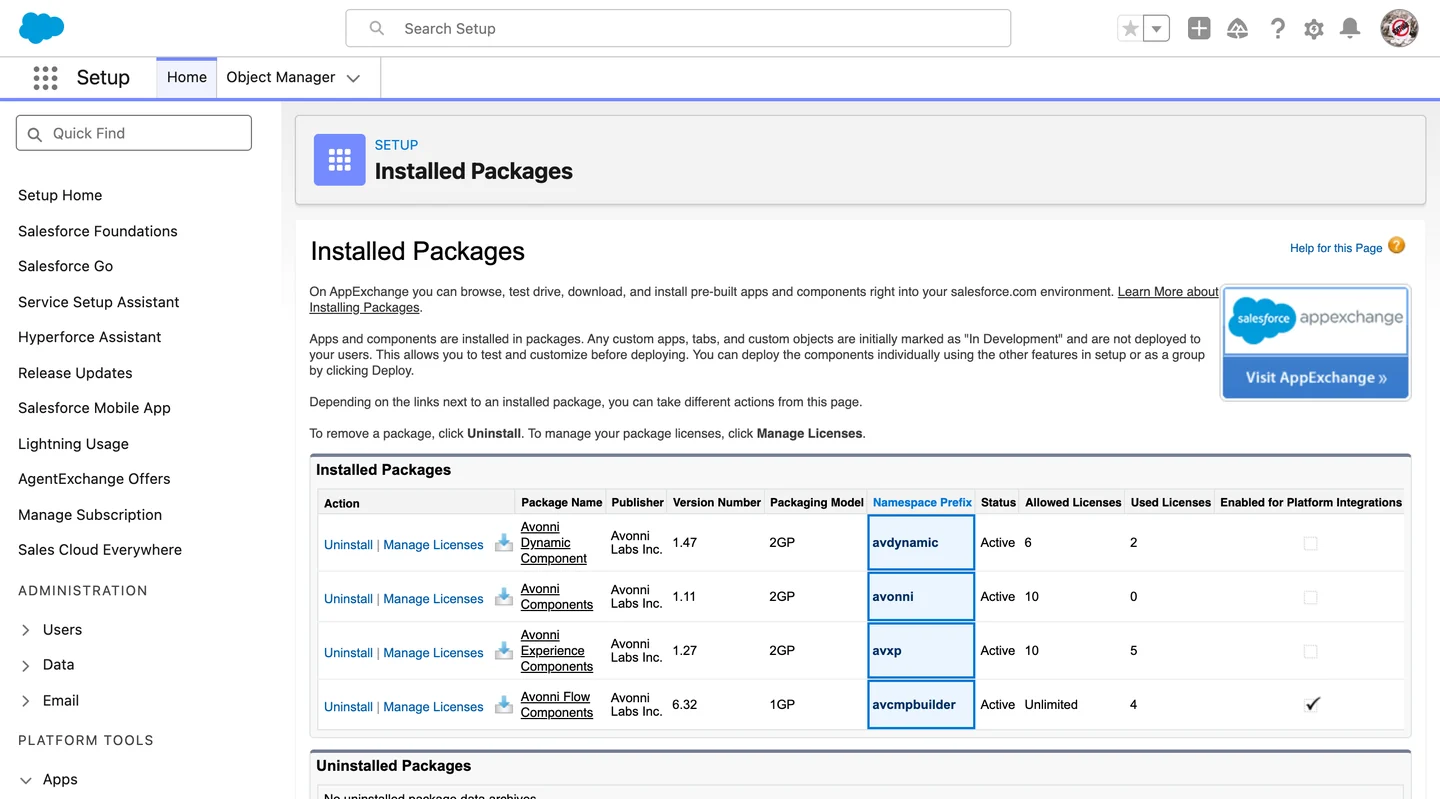
Three managed packages, each under its own namespace. Install one now and add the others when you need them.


Setup, Installed Packages, in a Salesforce org with Avonni installed. Other packages are hidden.
Orgs still on the older standalone Dynamic Components package see it as Avonni Dynamic Component, namespace avdynamic.
Lightning web components, Apex classes, custom metadata types, custom permissions and static resources. Component definitions are custom metadata records in your org, so your backup and sandbox tooling already covers them.
Builder access comes from permission sets shipped with the package. People who only use the components don't need it.
Uninstalling removes the package and its component definitions, so export them first. Your business records are not touched.
Like every Salesforce extension, security is shared between the vendor and your team.
Passing the AppExchange security review
Enforcing FLS, CRUD and sharing in the package code
Flagging security fixes in the release notes
Answering disclosure reports within one business day
Reaching your org only through login access you grant
Keeping customer data and credentials confidential
Configuring components, queries and actions to your policies
Keeping FLS, CRUD and sharing right on the objects you use
Reading release notes and upgrading on your schedule
Reporting suspected issues to security@avonni.app
Granting, scoping and revoking that access
Users, SSO, MFA, IP ranges and session policies
Avonni processes your data only inside your org, so the certifications of your Salesforce edition apply to what your users do in it.
As applicable to your edition. Current certificates are on trust.salesforce.com.
Avonni does not hold a SOC 2 report of its own. Its security is checked every year by the AppExchange review, and it runs on Salesforce, which is SOC 2 attested.
The review confirmation, a DPA, a mutual NDA, and completed questionnaires (SIG, CAIQ or your own). Write to security@avonni.app.
Email security@avonni.app rather than a public forum. We acknowledge within one business day.
Avonni is a Canadian company headquartered in Quebec.
New versions never install themselves. You upgrade from Setup, under Installed Packages, when you're ready.
They are flagged in the release notes, and admins of affected orgs get an email when it's serious.
Sandboxes are free with unlimited users. Production is free for up to 10 users, with no time limit.
Yes. Avonni is listed on the AppExchange, which requires passing the review, and Salesforce reviews it again every year.
Not for Avonni. Components read and write through Salesforce, and nothing is sent to an Avonni service. Traffic outside Salesforce exists only when you set it up: a callout, an external object, an iframe, a URL, the tiles of a Leaflet map, or a route calculated on it.
No. Avonni has no standing access to your org. You can grant temporary support access through Salesforce's Grant Login Access, and revoke it at any time.
Yes. Queries run as the viewing user, in USER_MODE. A field the user can't read makes Salesforce refuse the query rather than return it, and records follow your sharing rules.
avxp for Experience Components, avcmpbuilder for Flow Screen Components, avonni for LWC Components. The older standalone Dynamic Components package uses avdynamic.
A few internal classes read only the package's own custom metadata, the component definitions, which have no record-level access. They never read your business records.
Install in a sandbox and run your own checks, or send your questionnaire to security@avonni.app.