No code required

Your components, wearing your brand

They match Salesforce out of the box, adopt your site theme on Experience Cloud, and you fine-tune colors, fonts, and spacing from there. No code to start, custom CSS when you want it.

Auto
theme adoption on your Experience sites
0
code to start, custom CSS when you want it
Any
color, font, and spacing, per component
How it works

From Salesforce default to fully yours

Your components start on-brand because they follow Salesforce styling. From there, branding is a panel, not a project.

1

Start on-brand

Components follow Salesforce styling out of the box, so they look native the moment you drop them in.

2

Adopt your theme

On Experience Cloud, components pick up your site theme automatically, and you can override it per component.

3

Fine-tune and reuse

Adjust colors, fonts, and spacing in the Style panel, save named styles to reuse, and add custom CSS when you need it.

Theme adoption
Style panel
Reusable styles
Copy and paste style
Component templates
Custom CSS
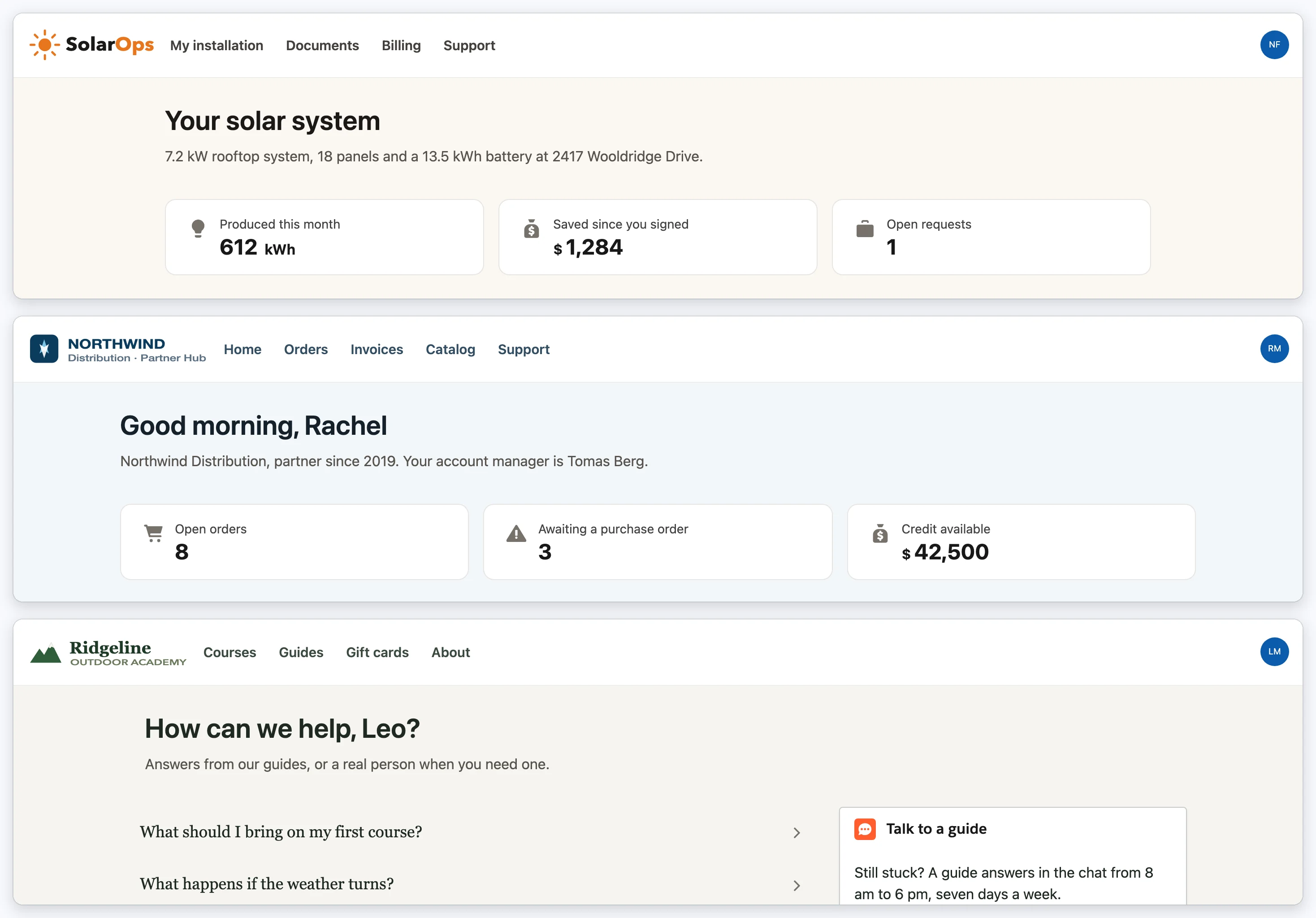
The same Avonni components on three published Experience Cloud sites: SolarOps in amber, Northwind Distribution in navy and Ridgeline Outdoor Academy in forest green, each with its own logo, navigation, type and metric cards
Three live Experience Cloud sites. Same components, three brands, no custom CSS.
In every package

Branding tuned to where you build

Each builder gives you the branding controls that fit its surface, all following the same Salesforce styling foundation.

Experience Cloud Components

Portals and sites

Components adopt your site theme automatically. Bind to your DXP theme, or drop to custom CSS for full control.

Theme adoptionGlobal theme bindingCustom CSS
Learn more
Dynamic Components

Lightning pages

Style each component in the Style panel, then save reusable named styles you can apply and edit across components.

Style panelReusable custom styles
Learn more
Flow Screen Components

Guided processes

Set colors, fonts, and spacing in the Style panel, and start from component templates to keep screens consistent.

Style panelComponent templates
Learn more
Use cases

What teams brand first

A portal that looks like you

Let your Experience site theme flow into every Avonni component, so the portal matches your brand without page-by-page work.

One look across many pages

Save a named style once and reuse it on every Dynamic Component, then update it in one place when the brand changes.

On-brand guided screens

Start Flow screens from a template with your colors and spacing already set, so every step feels consistent.

Why it matters

Your brand lives in the builder, not scattered across stylesheets

On the platform, custom styling usually means CSS spread across components, maintained by developers and shipped through deployments. Avonni keeps colors, fonts, and spacing in the component configuration, so an admin can set the look and change it later without a release.

Salesforce default
Your brand
On the platform

Brand styling is written in CSS and maintained through deployments.

With Avonni

The same styling is configured in the component and edited in place, with custom CSS available when you want it.

FAQ

Questions about branding

Do I need to style everything myself?

No. Components follow Salesforce styling out of the box, and on Experience Cloud they adopt your site theme automatically. You only adjust what you want to change.

Can I reuse a style across components?

Yes. In Dynamic Components you save named custom styles, apply them across components, and edit them in one place to update everywhere they are used.

What can I change?

Colors, fonts, spacing, borders, and padding through the Style and Appearance panels. For anything beyond that, you can add custom CSS.

Does it work with my Experience Cloud theme?

Yes. Components adopt your site theme, and you can bind directly to your DXP theme values so branding stays in sync.

Is it free to try?

Yes. Every Avonni plan starts free with 10 licenses and no time limit, installed from the AppExchange into your own org.

Make every component yours

Put your brand on Salesforce without the CSS backlog. Start free with 10 licenses, straight from the AppExchange.