Why Avonni

Go past standard components. Skip the custom code.

When a screen needs more than the standard components, the usual answer is a code project. Avonni gives you the component instead.

85+
components
4
Salesforce surfaces
0
Apex classes to deploy

Same org, same deals, same drag.

Salesforce · Kanban Board (Beta)

Read-only by design: the card stays where it is.

Avonni · Kanban

The card moves, the stage is saved, both totals recount.

Three ways to build a screen

Every custom screen starts with the same choice.

Use what Salesforce ships, write it yourself, or configure it with Avonni.

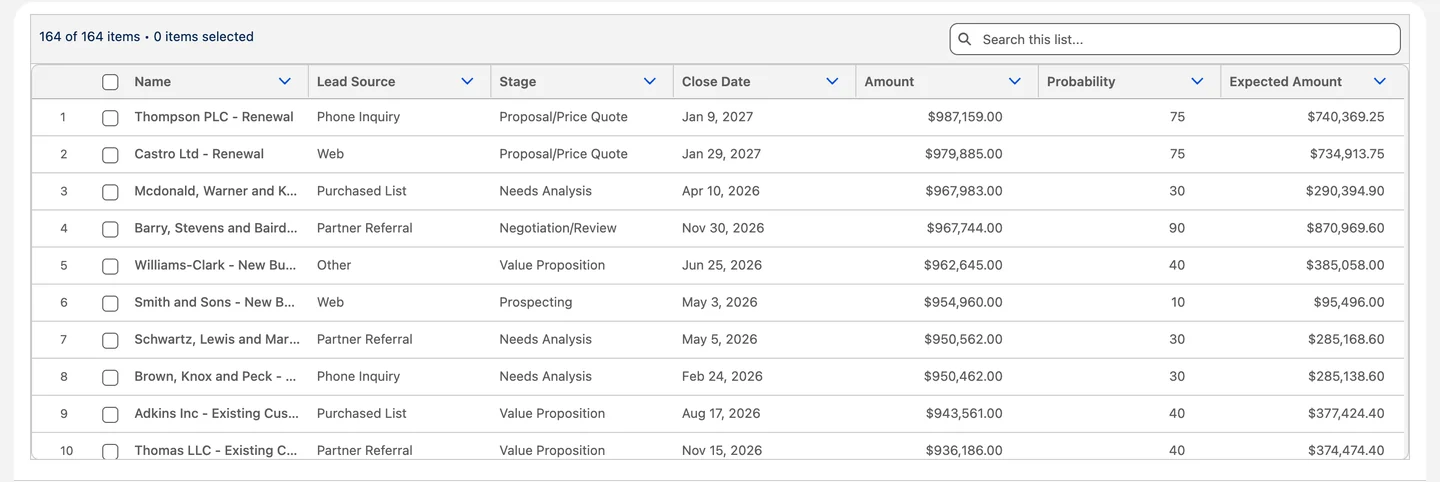
The standard Salesforce Flow Data Table showing open deals: plain columns, a search bar and row checkboxes
Standard components

Quick to add. Fixed options.

Supported by Salesforce, configured in the builders you know. Each one does what it ships with.

Where Avonni fits
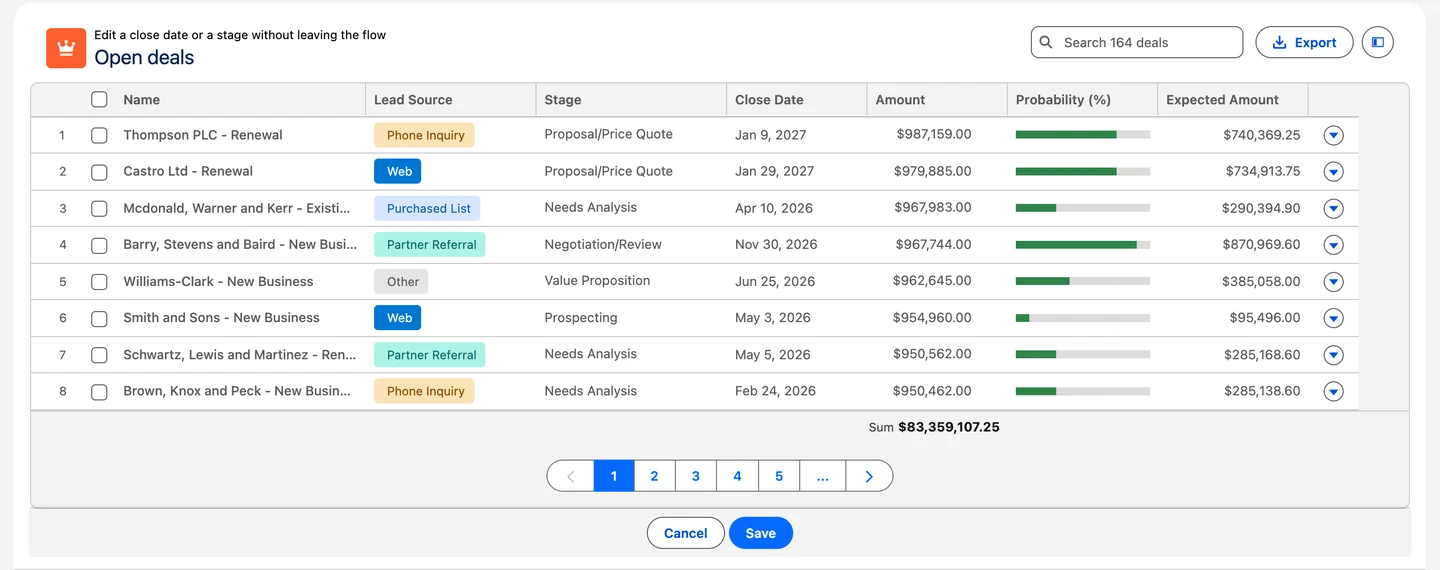
The Avonni Data Table on the same open deals: colored lead source badges, probability bars, search, export and row actions
Avonni components

Configured like standard. Built like custom.

The query, the actions and the styling are settings on the component. We maintain the internals across Salesforce releases.

ExpenseController.cls
expenseApprovals.js
…Test.cls
public with sharing class ExpenseController {
@AuraEnabled(cacheable=true)
public static List<Expense__c> getExpenses() {
return [SELECT Id, Name, Amount__c, Status__c
FROM Expense__c WITH USER_MODE];
}
}
Custom code

Anything goes. You own all of it.

An LWC, an Apex controller, tests and a deploy for every change. Three Salesforce releases a year keep it on your roadmap.

What does the code path cost over five years? Open the calculator →

Side by side

Same need. Standard, then Avonni.

Four Salesforce surfaces, filmed in real orgs.

In a screen flow

A table your users can work in

Standard

The Flow Data Table searches, sorts and edits basic field types. It shows up to 1,500 records and lets users select up to 200.

With Avonni

The table runs its own query, no Get Records step. Grouped rows with subtotals, a filter panel, row actions and export are settings on the component.

Compare both tables line by line →
The standard Salesforce Flow Data Table on the same open deals, in the same screen flow: plain columns, a search bar and row checkboxes

Same flow, same 164 open deals, same columns.

On a Lightning page

Revenue by region and quarter, on the page

Standard

A matrix report builds this view in the Reports tab, and the Report Chart component brings its chart onto a page.

With Avonni

A pivot table on the page itself, fed by a query: regions by quarter, with row totals, column totals and a grand total, sorted in place.

Explore the Pivot Table →

Closed won revenue, sorted by region on a Lightning page.

On an Experience site

A partner portal that does real work

Standard

Experience Builder ships components for records, lists and content, styled by your site's theme.

With Avonni

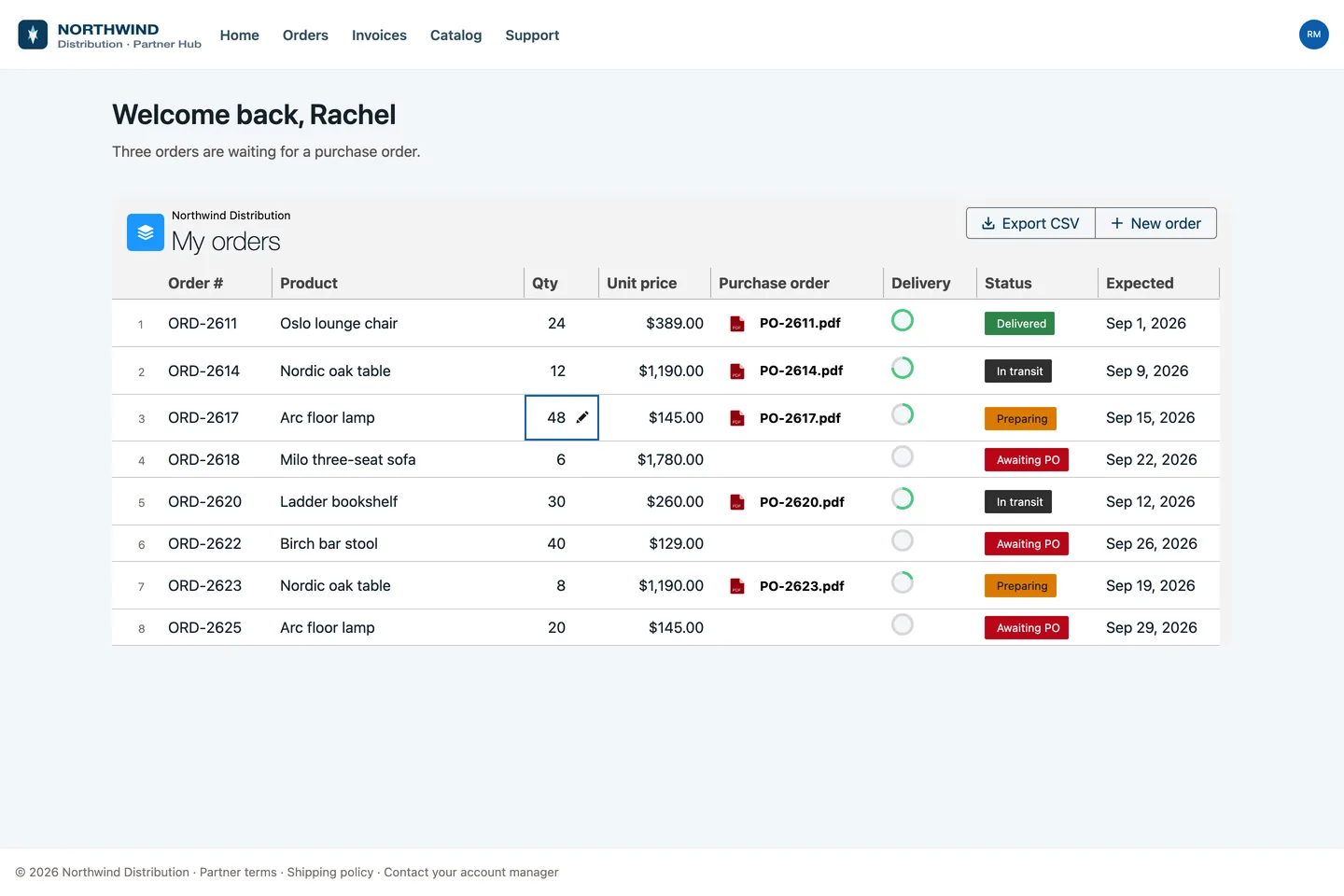
Orders, purchase orders and delivery status in one table, fed by a query and styled by the same site theme.

See client portals →
Northwind partner portal on Salesforce Experience Cloud: an Avonni Data Table of orders with purchase order PDFs, delivery progress rings and status badges

Northwind's partner hub, a real Experience site.

In your own code

One tag instead of a component and a class

Standard

lightning-datatable renders the rows. The data comes from a wire adapter or an Apex method you write and test.

With Avonni

avonni-dd-datatable-group-by takes the query, the grouping, the filters and the search as attributes. No Apex class behind it.

Compare with building it yourself →
expenseApprovals.html
<template>
<avonni-dd-datatable-group-by
header-title="Expense approvals"
query={expenses}
columns={columns}
group-by-attributes={groupBy}
filters={filters}
search-fields={searchFields}
header-actions={headerActions}
onheaderactionclick={handleApprove}>
</avonni-dd-datatable-group-by>
</template>
On top of every component

What comes with every Avonni component.

The same layer in Screen Flows, on Lightning pages and on Experience sites.

Data without Apex

Pick an object, fields and conditions. The query runs as the viewing user, with their permissions.

Data Sources →

Actions without code

50+ interactions: update a record, open a flow, show a toast. Wired to clicks, drops and row actions.

Interactions →

Your brand, set once

Colors, fonts and styles live in the builder. On Experience sites, components pick up your site theme.

Custom Branding →
list_components
get_component_docs
list_interactions
get_interaction_docs

Built with your AI assistant

Point Claude or any MCP client at Avonni: your agent finds components, reads the docs and configures them for you.

Agent Skills →
For your team

What changes for the people who build and use it.

We considered building our own components or delving into our own LWCs, but Avonni's value proposition was unbeatable. A stellar user experience without writing a single line of code.
Tyler Teachman · Hitachi High Tech America
Admins

Admins ship the screen. They configure the table, the board or the map in the builder they already use, without waiting on a developer.

Developers

Developers skip the plumbing. One tag and a query, no Apex controller to write or cover with tests. Their code stays on the business logic.

Your users

Users get screens that fit the work. They drag a deal to its next stage or sign off a job inside the flow, where the work already happens.

Before you install

The questions your architect will ask.

Straight answers, taken from our security documentation.

Runs inside your org

Queries run as the viewing user, with your field-level security, object permissions and sharing rules. In Flow, a query can opt into system mode for reads, only if you turn it on.

Your data stays in Salesforce

Nothing goes to an Avonni service, and the package does not call home at runtime. One exception: the Leaflet map loads its tiles from OpenStreetMap, a site you add as trusted.

Upgrades on your schedule

Updates are never pushed to your org. You choose the version and try it in a sandbox first.

A managed package

You configure and style the components. The code inside them stays in the package, and we maintain it.

Leaving is clean

Uninstalling removes Avonni's component definitions, so export them first. Your records are not touched.

Standard still comes first

If a standard component covers the screen, use it. Avonni is for the screens that need more.

Read the security details →

Try it on a screen you need this month.

Install in a sandbox, free with unlimited users, or walk through your use case with our team.

One subscription, 10 free licenses to start.