UI components for Salesforce ISVs & OEMs

Your roadmap is features. Not UI plumbing.

Product teams that sell their app as a Salesforce managed package build its screens on Avonni. You ship sooner, the UI layer is maintained for you, and the screens carry your brand, not ours.

55+
LWC components to build on
Per org
not per user
Security
review passed on AppExchange
Inside each customer org
Your managed package
yourapp__ namespace · your brand
<c-dispatch-board><c-account-tree><c-approval-queue>
depends on
Avonni Components
avonni namespace · maintained by Avonni
<avonni-dd-scheduler><avonni-dd-relationship-graph><avonni-dd-datatable-group-by>

Your users see your product. Admins see both packages in Setup.

The ISV math

Every component you build is one you maintain forever.

A data table in your package is not a sprint. It is a security review, three Salesforce releases a year and every customer who depends on it.

Built in your package
Built on Avonni
A data table with inline editing
800 to 1,200 lines to own
About 30 lines of config
Apex controllers and test classes
Required for each component
Not needed in query mode
SLDS styling and accessibility
Yours to build and test
Included, with styling hooks
Salesforce releases
Regression tests three times a year
SpringSummerWinter
Maintained managed package
Security review
Your UI code, reviewed with every version
AppExchange security reviewed
Your developers' AI assistant
A black box to the AI
Discoverable component catalog
Put a number on it: open the cost calculator →
What ISVs ship on Avonni

Your product's hardest screens, one tag each.

Three screens an ISV would otherwise build and maintain inside its package. Each is a component from your own namespace wrapping a single Avonni tag. Filmed in a demo org.

Dispatch board

A dispatch board your customers run their day on.

  • Timeline, agenda and calendar views from one tag
  • Reschedule and reassign from the event popover
  • Records queried and mapped by the component, no Apex
force-app/main/default/lwc/dispatchBoard/dispatchBoard.html
<template>
  <avonni-dd-scheduler
    variant="timeline"
    query={workOrders}
    mapping={mapping}
    item-actions={jobActions}
    onitemactionclick={handleJob}>
  </avonni-dd-scheduler>
</template>
Account hierarchy

An account hierarchy that opens where the user clicks.

  • Accounts, contacts and deals from one nested query
  • Actions on the root, on each group and on each record
  • Expands level by level, no page reload
force-app/main/default/lwc/accountTree/accountTree.html
<template>
  <avonni-dd-relationship-graph
    label={accountName}
    variant="horizontal"
    query={accountTree}
    mapping={mapping}
    item-actions={itemActions}
    onitemactionclick={handleOpen}>
  </avonni-dd-relationship-graph>
</template>
Approval queue

An approval queue that groups, filters and acts.

  • Rows grouped by employee, with a count per group
  • Search, filters and header actions built in
  • Approve the selected lines in one click
force-app/main/default/lwc/approvalQueue/approvalQueue.html
<template>
  <avonni-dd-datatable-group-by
    header-title="Expense approvals"
    query={expenses}
    columns={columns}
    group-by-attributes={groupBy}
    filters={filters}
    header-actions={headerActions}
    onheaderactionclick={handleApprove}>
  </avonni-dd-datatable-group-by>
</template>
How it works

Build on Avonni. Ship under your name.

1

Build

Your developers use the Avonni LWC library inside your own components. Their AI assistant gets the same Agent Skills and MCP server our customers use.

2

Package

Your managed package lists the Avonni package as a dependency. It installs next to yours in each customer org, and your users only ever see your product.

3

Scale

One license per org: your own production orgs and the customer orgs your package reaches. No user counts, no seat audits.

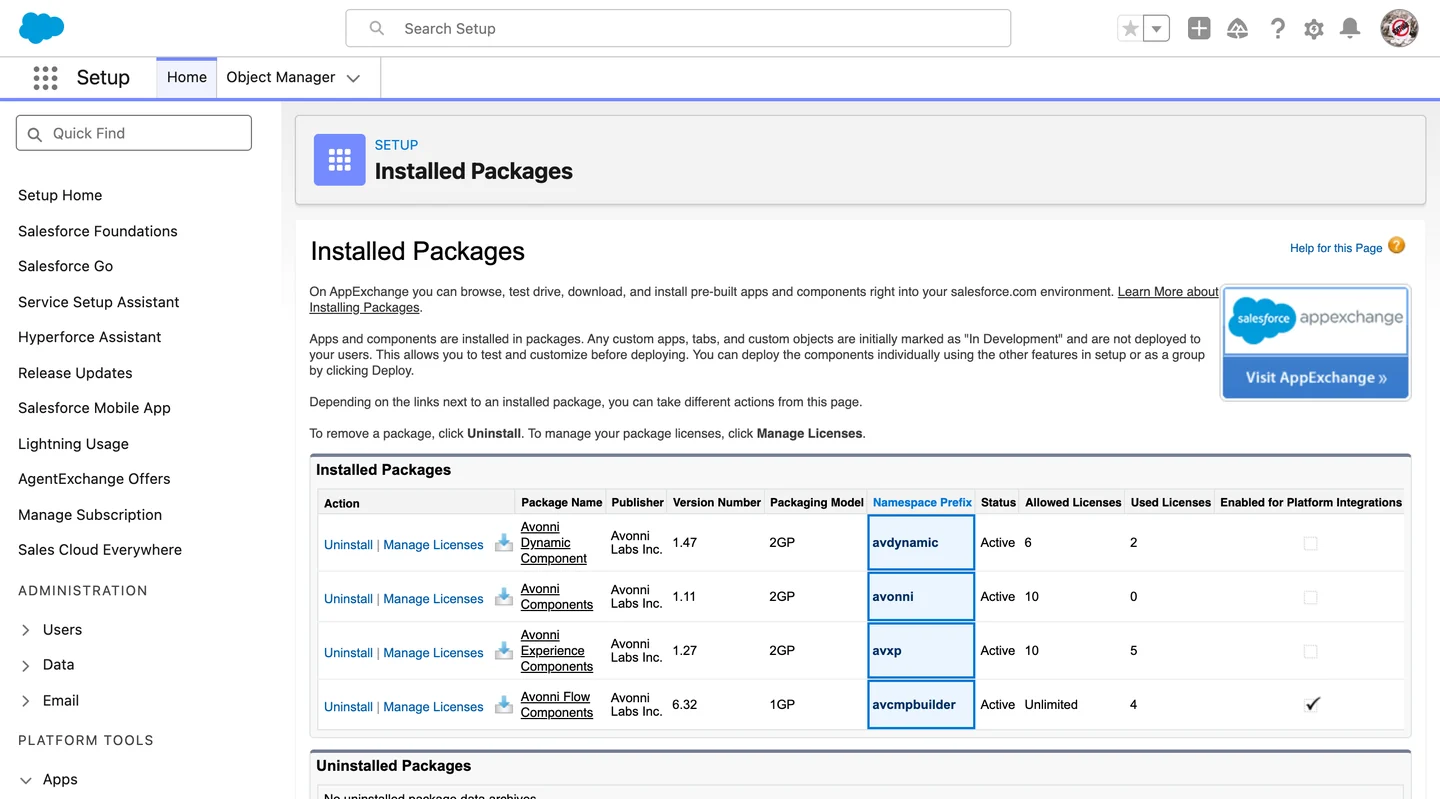
Setup · Installed Packages

Salesforce Setup, Installed Packages: the Avonni packages listed with AppExchange Ready marked Passed.
OEM licensing

Priced per org, not per user.

Your customers' headcount is not part of the price. The quote depends on your footprint, and three answers are enough to write it.

1

How many of your own production orgs run Avonni components.

2

Whether your managed package depends on Avonni, and in how many customer orgs, today and over the next 12 months.

3

Your target start date in production.

We send the licensing quote as soon as we have these answers.

Product teams already ship their managed packages on Avonni components.

ISV FAQ

Salesforce ISV and OEM questions

Will my customers see the Avonni brand?

Not on screen. The components carry no Avonni branding, and their styling hooks let you match your product's look. Admins will see the Avonni package in Installed Packages, next to yours.

How does the Avonni package get into my customers' orgs?

Your package declares it as a dependency, so Salesforce installs it first. It goes into each customer org before your package, like any other dependency.

Do my customers need their own Avonni license?

No. Their orgs are part of your per-org quote: you tell us how many customer orgs your package reaches, and the license covers them.

Which Avonni products can I build on?

The LWC component library, which your developers compose inside your own components. Dynamic and Flow components are available case by case, depending on what your product needs.

Does my package still go through security review?

Yes, like any AppExchange package. The Avonni package it depends on passed the review on its own.

Who supports my customers?

You do, and your team gets a direct line to the people who build the components.

Can my managed package use Lightning web components from another namespace?

Yes. With Lightning Web Security, a Lightning web component can use exposed components from another managed package installed in the same org. That is how your components use the Avonni package your app depends on.

Your product on Avonni. Your brand on the screen.

Send us your footprint and get your OEM quote.

Get your OEM quote
×
Get your quote
Three answers. One quote.
Tell us your footprint and we come back with your OEM licensing quote.
Thanks! Your answers are in. We will send your licensing quote shortly.
Something went wrong. Email us directly at cedric@avonni.app.