Salesforce has a native account hierarchy view, but it covers accounts only and opens on its own page. To show a hierarchy on a record page, inside a Screen Flow, on a custom object, or across several objects at once, you need a tree grid: a table whose rows expand to reveal the records below them. You can build one with code, or configure one without it. This post covers both, and what the native view already does well.
What the native account hierarchy does
On any account with a parent, the View Account Hierarchy action opens a page that shows the whole family: the parent, its children, and theirs. Admins pick up to 15 columns for it, and it displays up to 2,000 accounts. For a quick look at who owns what in a group of companies, it does the job.
Its limits show up as soon as the hierarchy becomes part of someone's daily work:
Accounts only. Parent cases, territories, custom objects with a self lookup: none of them get a hierarchy view.
Its own page. You can't drop it on the account record page next to the rest of the context, or inside a Screen Flow.
Read only. There are no row actions and no buttons: users look at the hierarchy, then go elsewhere to act on it.
One object. It can't show an account, then its opportunities, then their contacts, in the same table.
Option 1: build a tree grid with code
Salesforce's Lightning component library includes lightning-tree-grid, a base component that renders hierarchical rows. A developer writes the Lightning Web Component around it, plus the Apex that queries each level and assembles the nested data. It works, and it is yours to maintain: every new level, column or object is a code change.
Option 2: a tree grid without code
Avonni's Tree Grid does the same job without code. It exists as a Dynamic Component, for Lightning record, app and home pages, and as a Flow Screen Component, for Screen Flows. You configure it visually, level by level.
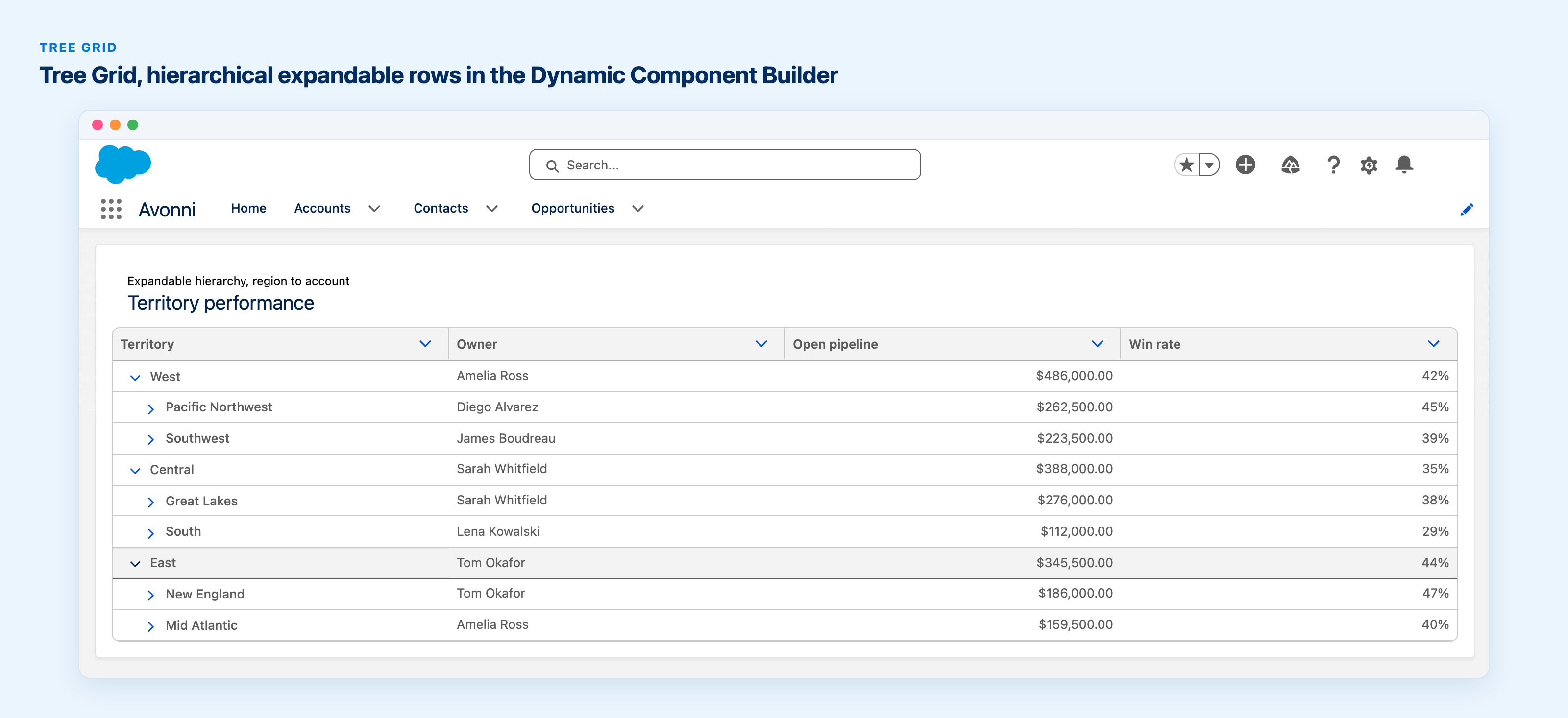
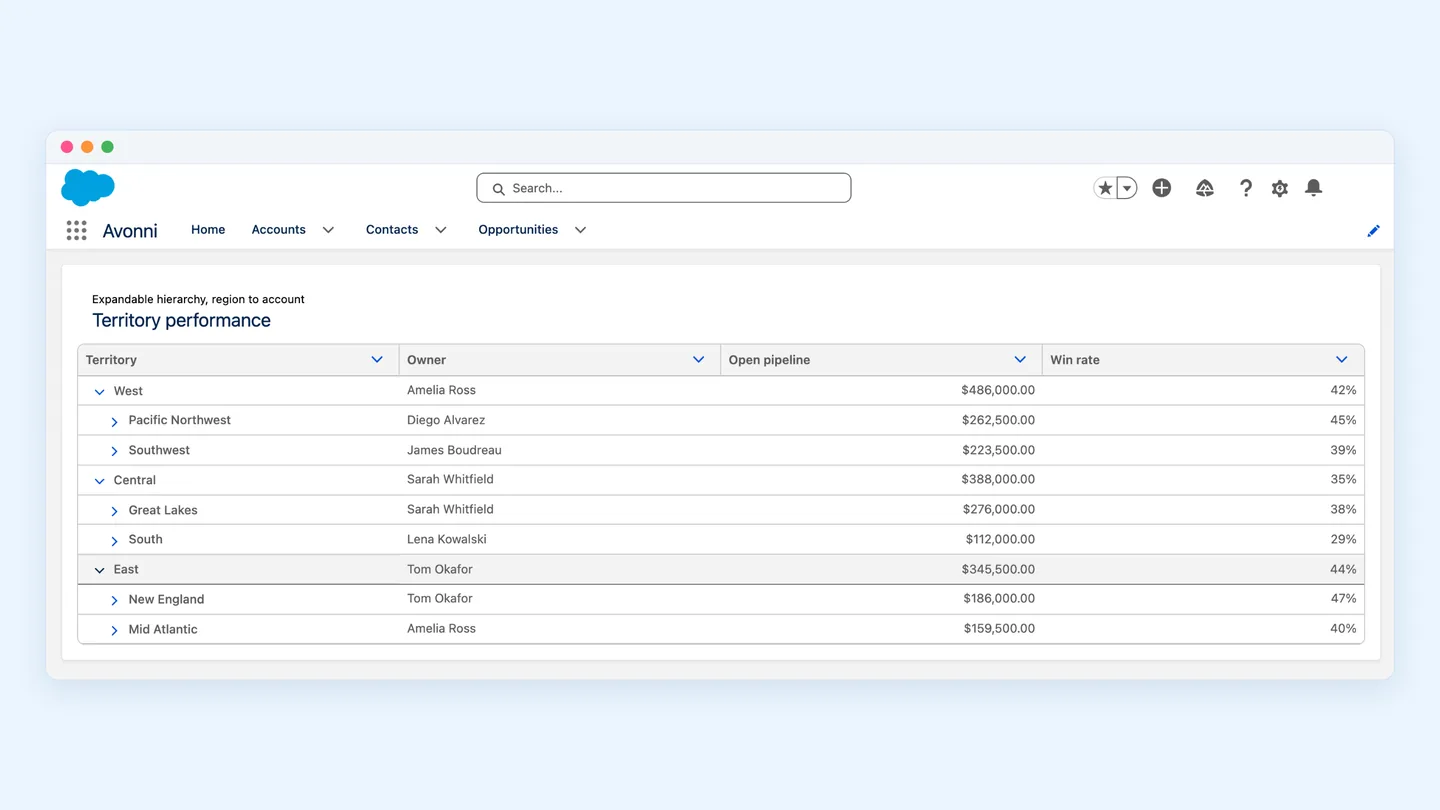
A Tree Grid built with Dynamic Components: regions expand into territories, with owner, open pipeline and win rate on every row.
Set up an account hierarchy
Add the Tree Grid and choose a query as the data source, on Account. This first query returns the top of the tree: for example, the account you want to start from.
Add a nested level: child object Account, relationship field Parent Account ID. Each row now expands into its child accounts.
Repeat the nested level for as many generations as your hierarchy has.
Pick your columns: name, owner, industry, annual revenue, anything on the account. Columns use the same display types as the Avonni Data Table, such as badges, currency and progress bars.
Add row actions or header buttons if users should act from the table: open a record, launch a flow, create a child account.
Mix objects in the same tree
The levels don't have to use the same object. An account can expand into its opportunities, and each opportunity into its contact roles or products. Each level is a query on the child object, linked to its parent by a relationship field.
On a page or in a flow
On a record page: build the Tree Grid with Dynamic Components and drop it on the account page with Lightning App Builder.
In a Screen Flow: use the Tree Grid from the Avonni Flow Screen Components, for example to let users select accounts in a hierarchy before the next step. Selected rows are available as outputs.
One limit to know
The Tree Grid builds the hierarchy downward, from the records its first query returns. Placed on a child account and started from that account, it shows what sits below it, not its parents. To show the whole group, start the tree from the top-level account.
The three options side by side
Native account hierarchy
Custom LWC
Avonni Tree Grid
Objects
Accounts only
Any
Any, and several in one tree
Where
Its own page
Anywhere you deploy it
Record, app and home pages, Screen Flows
Columns
Up to 15
Your choice
Your choice, with display types
Actions
None
Your choice
Row actions and header buttons
Direction
Parents and children
Your choice
Downward from the starting records
Code
None
LWC and Apex
None
FAQ
Can I show a hierarchy for a custom object?
Yes. Any object with a lookup to itself works the same way as Parent Account ID: add a nested level on the same object with that lookup as the relationship field.
How many levels can the tree have?
You add one nested level per generation. One of our customers runs a five-level account hierarchy built on Parent Account ID: group, subgroup, account, sub-account and agent code.
Can one tree mix accounts, opportunities and contacts?
Yes. Each level queries its own object, so a tree can go from accounts to opportunities to contacts.
Does it show the parents of a child account?
Not today. The tree builds downward from the records its first query returns. Start it from the top-level account to show the whole hierarchy.






%20(Vignette%20YouTube)%20(81).png)